Procedural FX Studio
Procedurally modeled, animated, simulated and rendered in Houdini.
Individual coursework for Procedural FX Studio.
Instructor: Benjamin Bailey
For this little experiment of “Cthulhu Cake”, the requirement was to create a 10 second animated clip of a cake entirely in Houdini, utilizing 1. fracture, 2. fluid, 3. pyro smoke and fire, 4. vellum cloth or hair or soft-bodies.
Since the one and only essential requirement for the assessment content was simply “cake” and we were encouraged to be creative, I decided to make something creepy and bizarre. I randomly recalled some short videos I had seen before, in which the creators made a lot of “Cthulhu-style” dishes ― food that combined unsettling color schemes with strange ingredients. For example, they used blueberries and lychees to make eyeballs, lotus root slices cut into skull shapes, and octopus tentacles, which appeared frequently.
Inspired by this, I decided to make a “Cthulhu cake.” (I originally wanted to include the Flying Spaghetti Monster as well, but ran out of time.) So, the first thing I needed to do was create octopus tentacles in Houdini.
⇲ Tentacles
When modeling the octopus tentacles, I started by following a YouTube tutorial that was published nine years ago. I noticed that many nodes in Houdini have since changed and evolved significantly. Some procedures that originally required multiple nodes and scripting in the video have now been streamlined into additional tabs and parameters within a single node, making the workflow easier.
However, there were still some other challenges. For instance, HScript has been deprecated in certain areas and will cause errors if used. Additionally, the ‘scatter’ node behaved differently, even though I followed the author’s steps and parameters exactly.
Fortunately, I found the solulu on the SideFX forum: simply using the Labs node ‘Resample by Density’ instead, while eliminating the need for extra attribute creations, while elegantly achieving, to some extent, better results from my observation.

↳ parametrized tentacle subnet
I put all the nodes for the tentacle inside a subnet and set up several adjustable parameters, so that by simply inputting a curve made of a few points, a tentacle can be generated automatically.
In this clip, the tentacle animation was controlled by an Attribute Noise node applied to the curve. I planned to explore this further by making it capable of generating a procedural rig, adding IK chains and possibly some procedural secondary motion. Ideally, once this setup is complete, I’ll be able to package it into an HDA and use it in UE.
⇲ Eyeballs
Another essential element I felt this creepy cake needed was lots of eyeballs. I wanted them to appear midway through the scene to create an unexpected effect.
So I followed another tutorial: used Voronoi Fracture to break up the plane; extruded the pieces, and set up pinpoints group; put it into a Vellum Balloon setup; used some VOP nodes to generate an animated Cd attribute that spreads from a few points across the entire plane; then, used a wrangle in a SOP solver on the constraint geometry to control the Pressure Constraint of the Vellum simulation.
↳ vellum eyeballs
With the addition of a viscous Fluid simulation, I was able to create the effect of a bunch of eyeballs gradually inflating and emerging from the gross and sluggish fluid topping above the static cake.
⇲ Copernicus
A point worth mentioning is the post-processing involved in the rendering workflow. I had been eager to try out Copernicus in Houdini, and after some research and learning, I again followed a tutorial and created a Slap Comp inside a COP network in addition to the usual render setup.
Using two additional RenderVars, world space position and smooth normal, a tri-planar projection UV for the scene was calculated. Then, with the Slope Direction and Distort nodes, a custom paintbrush texture I created was tiled and blended into the render. At last, I added some crazy HSV adjustments and chromatic aberration to finish this dramatic post-process effect.
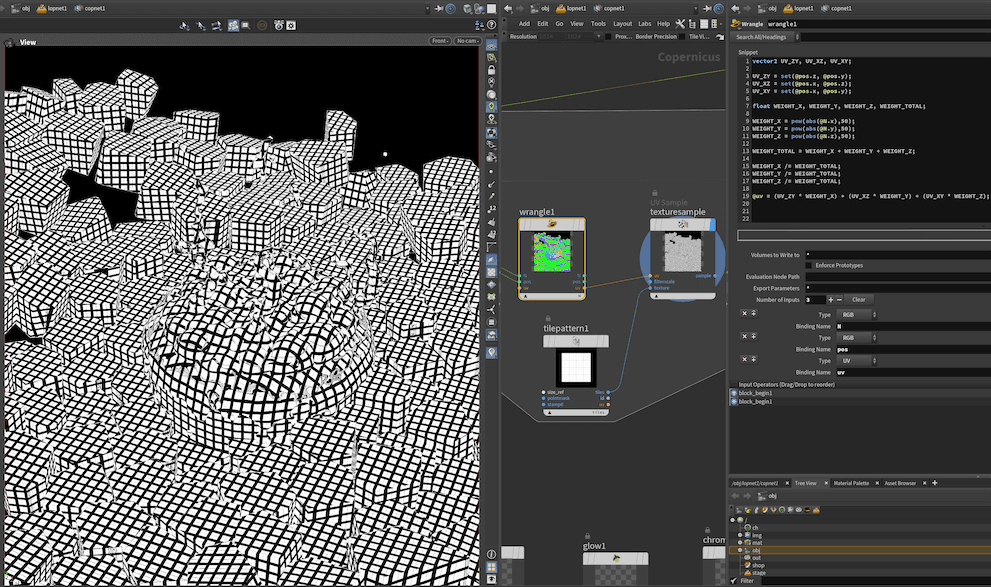
↳ wrangle for tri-planar projection
A painful lesson I learnt: auto save is disabled by default for every new project. Normally, Houdini is very stable for me, and crashes are rare. But when working inside the COP network, it crashed repeatedly - reminding me of the trauma of working in Autodesk apps - and I ended up losing two hours of work.
I used to struggle a lot and have been hated studying a math major in my undergrad time, but when I dive into Houdini for procedural modeling, I was cheerful to somehow unconsciously realize the beauty of math in a practical manner – for instance, using a power function and setting up a parameter accordingly to adjust the strength of some values, despite that it only utilizes simple math knowledge from middle school.
One final thought: a lot of stuff in Houdini are indeed obscure and difficult to grasp, but their documentation is usually helpful. The real challenge, though, is that often I don’t even know where to start ― and that’s where GPT has helped me a lot. Although it sometimes produces problematic VEX code or suggests solutions that aren’t fully workable, combining its guidance with some additional online research has often led me to the answers I need.
Another procedural experiment for Procedural FX Studio.
⇲ Hand
When I first saw "March of the Ding Dings" in class, I was immediately intrigued. Those little creatures had lots of variations and were full of squash and stretch, giving them a really appealing, bouncy quality. After watching the character tutorial from Christopher Rutledge, I started my first trial of procedural rigging and made this walking hand in Houdini.
Throughout the process, I kept thinking back to my experience rigging in other DCC. Rigging is definitely not easy, especially when it comes to non-humanoid or unconventional characters (like creatures with three heads or six arms…) or rigging for props. It often involves dealing with a lot of nodes and doing quite a bit of math. Things become even more complicated when you start adding cloth simulations on top of skeletons.
I found Houdini’s approach refreshing. While it’s maybe not as intuitive as using plugins like Advanced Skeleton or Auto-Rig Pro available in other DCCs, the amount of customization and control you get in Houdini is incredible. The entire setup is built from nodes, and I think it’s especially well-suited for creating unconventional, strange characters with many variations.
Adding Vellum simulations on top of the character animation was also exciting. More importantly, since everything is procedural, if I’m unhappy with something early in the process, I can adjust those upstream nodes—something that’s nearly impossible in a traditional, non-procedural workflow.
Another thing I found very compelling was the use of nodes to quickly generate secondary motion—this is perfect for simpler animations that don’t require high precision but still need that extra polish. The tutorial also showed how to retarget a standard biped walk cycle to a round, squishy creature, which I found really useful.
⇢The End
⇢Tom's Journal
⇢Aug 2025
Procedural FX Studio
Procedurally modeled, animated, simulated and rendered in Houdini.
Individual coursework for Procedural FX Studio.
Instructor: Benjamin Bailey
For this little experiment of “Cthulhu Cake”, the requirement was to create a 10 second animated clip of a cake entirely in Houdini, utilizing 1. fracture, 2. fluid, 3. pyro smoke and fire, 4. vellum cloth or hair or soft-bodies.
Since the one and only essential requirement for the assessment content was simply “cake” and we were encouraged to be creative, I decided to make something creepy and bizarre. I randomly recalled some short videos I had seen before, in which the creators made a lot of “Cthulhu-style” dishes ― food that combined unsettling color schemes with strange ingredients. For example, they used blueberries and lychees to make eyeballs, lotus root slices cut into skull shapes, and octopus tentacles, which appeared frequently.
Inspired by this, I decided to make a “Cthulhu cake.” (I originally wanted to include the Flying Spaghetti Monster as well, but ran out of time.) So, the first thing I needed to do was create octopus tentacles in Houdini.
⇲ Tentacles
When modeling the octopus tentacles, I started by following a YouTube tutorial that was published nine years ago. I noticed that many nodes in Houdini have since changed and evolved significantly. Some procedures that originally required multiple nodes and scripting in the video have now been streamlined into additional tabs and parameters within a single node, making the workflow easier.
However, there were still some other challenges. For instance, HScript has been deprecated in certain areas and will cause errors if used. Additionally, the ‘scatter’ node behaved differently, even though I followed the author’s steps and parameters exactly.
Fortunately, I found the solulu on the SideFX forum: simply using the Labs node ‘Resample by Density’ instead, while eliminating the need for extra attribute creations, while elegantly achieving, to some extent, better results from my observation.
↳ parametrized tentacle subnet
I put all the nodes for the tentacle inside a subnet and set up several adjustable parameters, so that by simply inputting a curve made of a few points, a tentacle can be generated automatically.
In this clip, the tentacle animation was controlled by an Attribute Noise node applied to the curve. I planned to explore this further by making it capable of generating a procedural rig, adding IK chains and possibly some procedural secondary motion. Ideally, once this setup is complete, I’ll be able to package it into an HDA and use it in UE.
⇲ Eyeballs
Another essential element I felt this creepy cake needed was lots of eyeballs. I wanted them to appear midway through the scene to create an unexpected effect.
So I followed another tutorial: used Voronoi Fracture to break up the plane; extruded the pieces, and set up pinpoints group; put it into a Vellum Balloon setup; used some VOP nodes to generate an animated Cd attribute that spreads from a few points across the entire plane; then, used a wrangle in a SOP solver on the constraint geometry to control the Pressure Constraint of the Vellum simulation.
↳ vellum eyeballs
With the addition of a viscous Fluid simulation, I was able to create the effect of a bunch of eyeballs gradually inflating and emerging from the gross and sluggish fluid topping above the static cake.
⇲ Copernicus
A point worth mentioning is the post-processing involved in the rendering workflow. I had been eager to try out Copernicus in Houdini, and after some research and learning, I again followed a tutorial and created a Slap Comp inside a COP network in addition to the usual render setup.
Using two additional RenderVars, world space position and smooth normal, a tri-planar projection UV for the scene was calculated. Then, with the Slope Direction and Distort nodes, a custom paintbrush texture I created was tiled and blended into the render. At last, I added some crazy HSV adjustments and chromatic aberration to finish this dramatic post-process effect.
↳ wrangle for tri-planar projection
A painful lesson I learnt: auto save is disabled by default for every new project. Normally, Houdini is very stable for me, and crashes are rare. But when working inside the COP network, it crashed repeatedly - reminding me of the trauma of working in Autodesk apps - and I ended up losing two hours of work.
I used to struggle a lot and have been hated studying a math major in my undergrad time, but when I dive into Houdini for procedural modeling, I was cheerful to somehow unconsciously realize the beauty of math in a practical manner – for instance, using a power function and setting up a parameter accordingly to adjust the strength of some values, despite that it only utilizes simple math knowledge from middle school.
One final thought: a lot of stuff in Houdini are indeed obscure and difficult to grasp, but their documentation is usually helpful. The real challenge, though, is that often I don’t even know where to start ― and that’s where GPT has helped me a lot. Although it sometimes produces problematic VEX code or suggests solutions that aren’t fully workable, combining its guidance with some additional online research has often led me to the answers I need.
Another procedural experiment for Procedural FX Studio.
⇲ Hand
When I first saw "March of the Ding Dings" in class, I was immediately intrigued. Those little creatures had lots of variations and were full of squash and stretch, giving them a really appealing, bouncy quality. After watching the character tutorial from Christopher Rutledge, I started my first trial of procedural rigging and made this walking hand in Houdini.
Throughout the process, I kept thinking back to my experience rigging in other DCC. Rigging is definitely not easy, especially when it comes to non-humanoid or unconventional characters (like creatures with three heads or six arms…) or rigging for props. It often involves dealing with a lot of nodes and doing quite a bit of math. Things become even more complicated when you start adding cloth simulations on top of skeletons.
I found Houdini’s approach refreshing. While it’s maybe not as intuitive as using plugins like Advanced Skeleton or Auto-Rig Pro available in other DCCs, the amount of customization and control you get in Houdini is incredible. The entire setup is built from nodes, and I think it’s especially well-suited for creating unconventional, strange characters with many variations.
Adding Vellum simulations on top of the character animation was also exciting. More importantly, since everything is procedural, if I’m unhappy with something early in the process, I can adjust those upstream nodes—something that’s nearly impossible in a traditional, non-procedural workflow.
Another thing I found very compelling was the use of nodes to quickly generate secondary motion—this is perfect for simpler animations that don’t require high precision but still need that extra polish. The tutorial also showed how to retarget a standard biped walk cycle to a round, squishy creature, which I found really useful.
⇢The End
⇢Tom's Journal
⇢Aug 2025
⇢swipe or scroll⇢