Industry Studio
Individual part of a group coursework for Industry Studio.
Ray character rig by CGTarian Online School.
"White Eagle Animation Fast Fly" by GremorySaiyan.
Music used: Apple Inc. (2007). Park Bench [Audio File]. Final Cut Pro.
Instructor: Melody Li
⇲ Environment
Our group contributor Charlie Xiong completed the modeling of this clean and adorable low-poly street environment. Based on her second version of the street scene, I created a custom stylized shader in Blender, which added brush-stroke-like surface details and edge outlines.
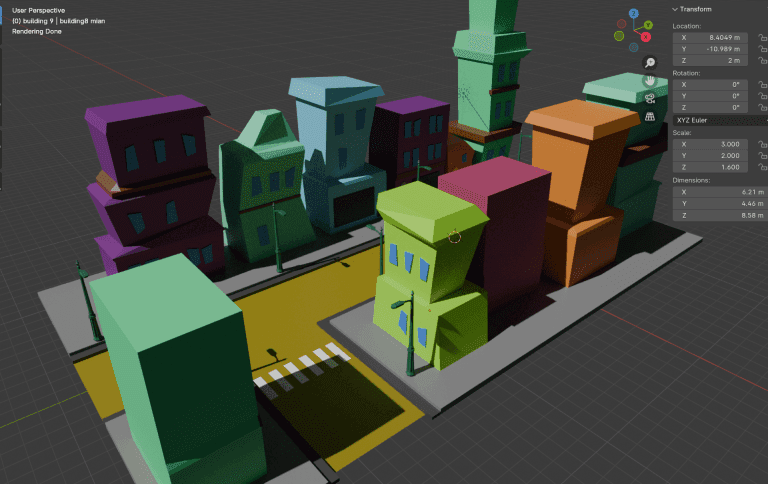
↳ modeling by Charlie
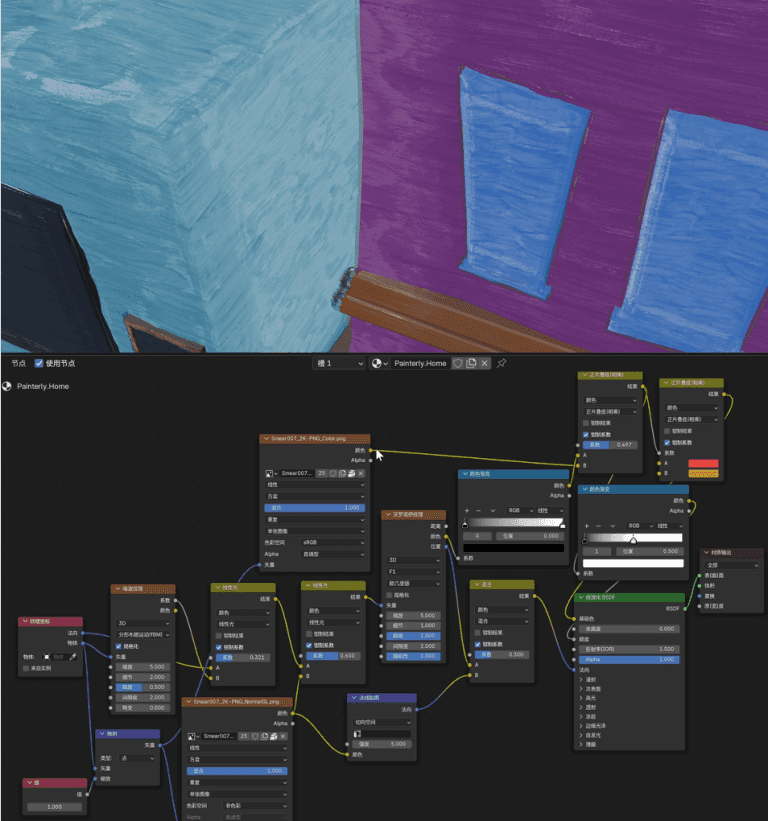
↳ custom stylized shader
⇲ Generated Flower Assets
The flower shop and the scenes would require a lot of flowers — both as decoration and as a hand-held prop. Considering our stylized, low-poly aesthetic, I decided to take this opportunity to integrate AI-based modeling into our workflow. I used Tripo3D and deployed Hunyuan3D 2.0 (an open-source model from Tencent) on my local machine.
The flowers were generated using these models, with textures painted automatically, and were then retopologized. Although these models would not meet the quality standards for high-end realistic projects, for our stylized animation, they were perfect — saving valuable time for other tasks.
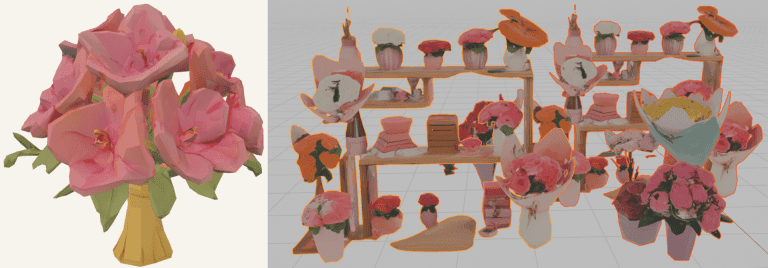
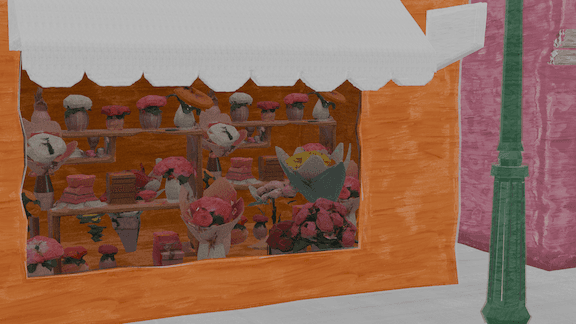
↳ AI model modeled
⇲ Pipeline
We finalized our basic production pipeline as follows:
0. Prepare the scene layout consistently in both Maya and Blender.
1. Animate the rigged characters in Maya.
2. Bake the animation to meshes and export as Alembic (.abc) files with UV information.
3. Import into Blender, reattach existing textures or assign new materials as needed.
4. Render using EEVEE, Blender’s real-time renderer.
This updated workflow provided two major advantages:
• It allowed us to achieve a stylized visual aesthetic efficiently.
• It significantly reduced rendering time compared to using a ray-traced renderer like Arnold in Maya.
⇲ Animation
↳ reference footages

↳ bird-dropping gag powered by blendshape
Animation production also brought its technical challenges. Initially, I attempted to use the UV Pin with offset parent matrix (OPM) to attach the protagonist’s watch and the flower bouquet to the character’s hands.
While OPM is usually a very elegant and flexible solution — far superior to traditional parenting or constraints — I discovered that during Alembic export, no matter how I changed the settings, only local transformation was being written. In the end, I reverted to using parent constraints to preserve their correct world matrix data through the export process.
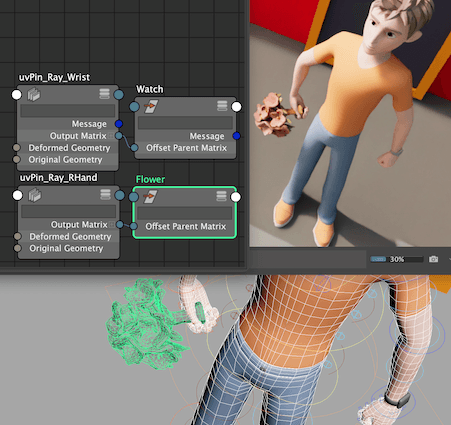
↳ UV Pin + OPM
↳ an easter-egg watch I created
⇢The End
⇢Tom's Journal
⇢Apr 2025
Industry Studio
Individual part of a group coursework for Industry Studio.
Ray character rig by CGTarian Online School.
"White Eagle Animation Fast Fly" by GremorySaiyan.
Music used: Apple Inc. (2007). Park Bench [Audio File]. Final Cut Pro.
Instructor: Melody Li
⇲ Environment
Our group contributor Charlie Xiong completed the modeling of this clean and adorable low-poly street environment. Based on her second version of the street scene, I created a custom stylized shader in Blender, which added brush-stroke-like surface details and edge outlines.
↳ modeling by Charlie
↳ custom stylized shader
⇲ Generated Flower Assets
The flower shop and the scenes would require a lot of flowers — both as decoration and as a hand-held prop. Considering our stylized, low-poly aesthetic, I decided to take this opportunity to integrate AI-based modeling into our workflow. I used Tripo3D and deployed Hunyuan3D 2.0 (an open-source model from Tencent) on my local machine.
The flowers were generated using these models, with textures painted automatically, and were then retopologized. Although these models would not meet the quality standards for high-end realistic projects, for our stylized animation, they were perfect — saving valuable time for other tasks.
↳ AI model modeled
⇲ Pipeline
We finalized our basic production pipeline as follows:
0. Prepare the scene layout consistently in both Maya and Blender.
1. Animate the rigged characters in Maya.
2. Bake the animation to meshes and export as Alembic (.abc) files with UV information.
3. Import into Blender, reattach existing textures or assign new materials as needed.
4. Render using EEVEE, Blender’s real-time renderer.
This updated workflow provided two major advantages:
• It allowed us to achieve a stylized visual aesthetic efficiently.
• It significantly reduced rendering time compared to using a ray-traced renderer like Arnold in Maya.
⇲ Animation
↳ reference footages
↳ bird-dropping gag powered by blendshape
Animation production also brought its technical challenges. Initially, I attempted to use the UV Pin with offset parent matrix (OPM) to attach the protagonist’s watch and the flower bouquet to the character’s hands.
While OPM is usually a very elegant and flexible solution — far superior to traditional parenting or constraints — I discovered that during Alembic export, no matter how I changed the settings, only local transformation was being written. In the end, I reverted to using parent constraints to preserve their correct world matrix data through the export process.
↳ UV Pin + OPM
↳ an easter-egg watch I created
⇢The End
⇢Tom's Journal
⇢Apr 2025
⇢swipe or scroll⇢